

RoundCube is a popular web interface for working with email. Thanks to its speed, simplicity, and ease of use, it has gained wide popularity. Many plugins have been developed for this web interface, and today we’ll look at installing a plugin for working with notes.
The notes plugin may seem simple at first glance — like a regular notepad — but unlike the latter, it’s always at hand, as it’s integrated into your personal mailbox managed by RoundCube.
1. Plugin Installation
Download the latest version from the following link:
https://github.com/dondominio/ddnotes
2. Installation
Unpack the archive on your server, rename the folder to ddnotes, and copy it into the plugins directory of your RoundCube installation.
Your directories should look approximately like this:
plugins
 - calendar
 - ddnotes
    - SQL
    - localisation
    - ...
2.1 Creating Tables
Run the following command to create the database structure for storing notes, replacing the paths and credentials as needed.
Here, roundcube is the username, and roundcubemail is the database name. You’ll be prompted to enter your password interactively.
The path /usr/share/roundcube/plugins/ddnotes/SQL/mysql.initial.sql may differ in your setup.
mysql -u roundcube -p roundcubemail < /usr/share/roundcube/plugins/ddnotes/SQL/mysql.initial.sql
2.2 Enabling the Plugin
Open the RoundCube configuration file — ../config/config.in.php — and add the plugin name ddnotes.
The plugins section should look like this:
$config['plugins'] = [
	'calendar',
	'markasjunk',
	'managesieve',
	'ddnotes',
];
3. Verification
Go to the web interface and refresh the page if necessary (Ctrl + F5).
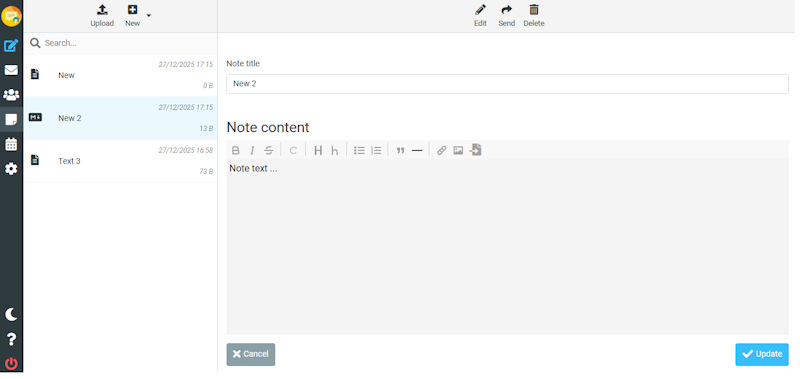
A new Notes item will appear in the left-hand menu. In this new section, you can add, delete, edit, and send existing notes as attachments.
4. Additional Configuration
If necessary, you can add your own localization in the localization folder by creating a new translation file following the existing naming pattern.
Additional plugin settings can be configured in
../plugins/ddnotes/defaults.inc.php or config.inc.php.
To enable custom configuration, rename config.inc.php.dist to config.inc.php.
Working with notes in your mailbox is just as convenient as using the calendar — everything you need is available as soon as you log into your email.